№ Frame extractor
YouTube to JPG — Extract Frames Online
A YouTube to JPG extractor is an online tool that pulls still-image frames from any YouTube video at a sampling interval you choose, and saves them as JPG files you can drop into your editor, contact sheet, or analysis app. AppsGolem's frame extractor samples every 100 milliseconds to 10 seconds across your selection, optionally burns the source-timeline timestamp onto each frame, and can compose the whole sequence as a single contact-sheet JPG — works entirely in your browser, no software to install, no watermarks added.
Start Extracting Frames →Watermark
No Watermarks
Install
No Software
Device
Works on Mobile
№ 01 / Workflow
How to Extract Frames from YouTube
Step 01
1. Paste YouTube Link
Copy the URL of the YouTube video and paste it into the AppsGolem cutter. Any public video works, up to 4K.
Step 02
2. Pick Interval & Range
Select the Frames format pill and pick a sampling interval from 100ms to 10s. Use the slider or HMS fields to set start and end times.
Step 03
3. Extract & Download
Click Extract & download. Get a ZIP of JPGs with a manifest, or toggle Contact sheet for a single composite image. Saved to your device instantly.
№ 02 / Use cases
What Can You Do with YouTube Frames?
Use case 01
Storyboards & Shot Lists
Sample one frame per second across a podcast, lecture, or stream. Drop the contact sheet into Notion or print it for shot-by-shot reference. The 1–2s interval is the sweet spot for editorial breakdowns.
Use case 02
Sports & Animation Analysis
Pull frames every 100ms — fast enough to study a golf swing, a dance move, or a frame-by-frame animation tween. Pair with the burn-in timestamp toggle so each frame carries its own source time.
Use case 03
Contact-Sheet Review
Photographer's-style overview of a 30 to 90 second scene. The composite JPG drops straight into Lightroom, Slack, or Figma — no folder to unzip, one image to share or print.
Use case 04
Single Snapshot at Playhead
Click the camera icon in the player toolbar (or press S) to grab one naked JPG at the current playhead. Same code path as the range extractor, optimized for the 'I want THIS frame' use case.
№ 03 / What you get
Three output shapes, one cutter.
Output 01
Clean JPG frames
Default output: a ZIP of JPGs. Filenames embed the source timestamp (frame-00-01-23.jpg), and a manifest.txt records the source URL, title, range, and inventory.

Output 02
Stamped frames
Toggle Stamp source timestamp on and each JPG gets the HH:MM:SS source time burned into the top-left corner — readable at a glance when filenames aren't visible.

Output 03
Contact sheet
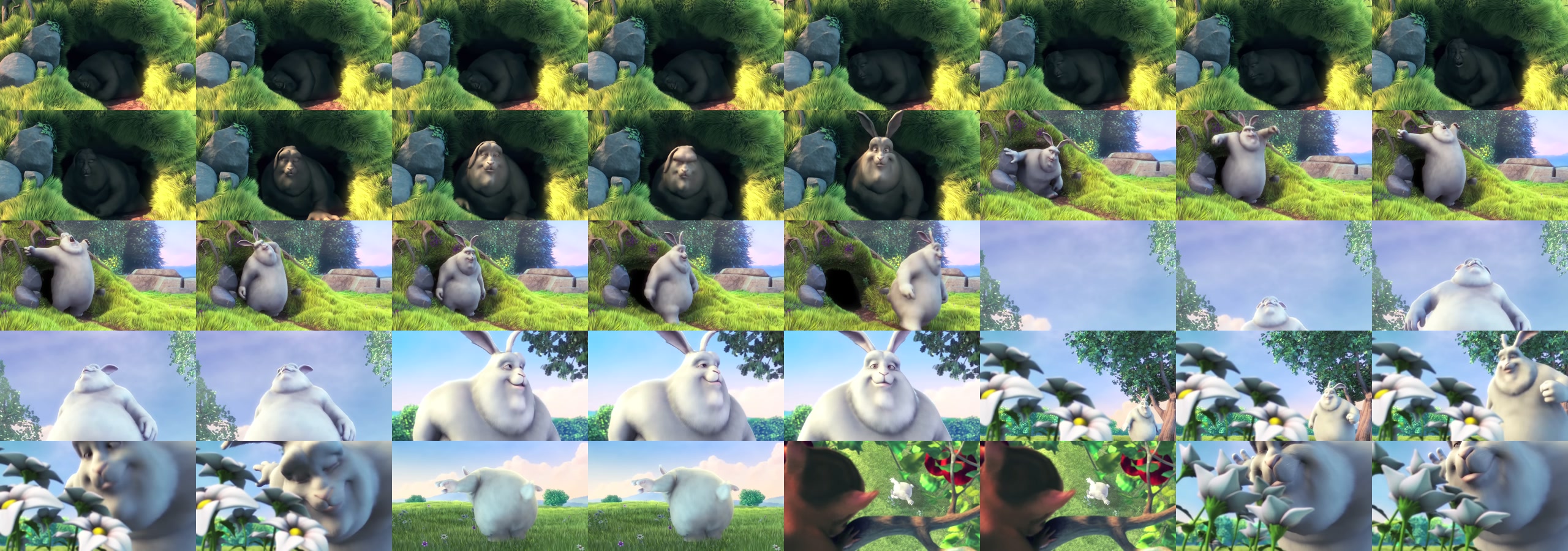
Toggle Contact sheet on and the cutter composes up to 80 frames into one JPG — 8-column adaptive grid, no folder to unzip, drops into Lightroom or Slack.
№ 04 / Key facts
YouTube to JPG — Key Facts
| Input | Any public YouTube video URL |
| Output formats | JPG (ZIP of frames, single frame, or contact-sheet composite) |
| Sampling intervals | 100ms · 500ms · 1s · 2s · 5s · 10s |
| Burn-in timestamps | Optional — HH:MM:SS source-time overlay, top-left, JetBrains Mono Bold |
| Contact-sheet grid | Up to 80 frames, 8-column adaptive layout |
| Frame-count cap | 1,800 per submission; 80 in contact-sheet mode |
| Manifest | manifest.txt at ZIP root with source URL, title, range, and frame inventory |
| Watermarks | None |
| Software needed | None — browser-based |
| Pricing | €18/year or €39 lifetime |
№ 05 / FAQ
YouTube to JPG: Frequently Asked Questions
Can I extract JPG frames from any YouTube video?
Yes. AppsGolem lets you extract frames as JPG images from any public YouTube video. Paste the URL, select the time range you want, choose Frames as the output format, pick a sampling interval, and download. Works for resolutions up to 4K.
What sampling intervals are available?
Pick from 100ms (10 frames per second — for sports analysis or animation reference), 500ms, 1 second, 2 seconds, 5 seconds, or 10 seconds (for hero-frame picking on long lectures or streams). Most users land on 1s or 2s for storyboard-style overviews.
Can I burn the source timestamp onto each frame?
Yes. Toggle Stamp source timestamp on and each JPG gets the HH:MM:SS source-timeline timestamp burned into the top-left corner using JetBrains Mono Bold (digit-width stable, no wobble between frames). Useful for sports review, forensic analysis, or contact-sheet review where filenames are not visible.
What is a contact sheet output?
Toggle Contact sheet on and the cutter composes up to 80 frames into a single JPG laid out in an 8-column grid (adaptive — small selections produce shorter grids, no padding rows of black tiles). Drop into Lightroom or Slack with no folder to unzip.
Is there a frame-count limit?
Range extraction is capped at 1,800 frames per submission. Contact-sheet output is capped at 80 frames per sheet (the 8×10 grid maximum). The cutter shows a live frame-count preview before submission so you can pick an interval that fits.
Sample · Stamp · Compose
Ready to Extract YouTube Frames?
Create a free account to start pulling JPG frames from any YouTube video.
Get Started →Secure & Private · Money Back Guarantee
№ 14 / Guides
More YouTube cutter guides.
MP4
YouTube to MP4 Cutter
Frame-accurate H.264 cuts that import into Premiere, DaVinci, Final Cut without re-conform.
Audio
YouTube to MP3
Extract Joe Rogan, Lex Fridman, or any podcast moment as MP4 or MP3.
Timestamp
Download a specific timestamp
Just the part you want — no whole-file download.
Save
Save a YouTube moment
Keep just the part that matters as an MP4 file.
Alternative
The YTCutter alternative
Everything a YT cutter should do — up to 4K, no ads, no watermark.
Long videos
Cut long videos
Trim multi-hour uploads without downloading the whole file.
GIF
YouTube to GIF
Turn any clip into a shareable animated GIF.
Frames
Extract JPG frames
Pull stills from any clip as a ZIP of JPG frames.
1080p
YouTube Clip Downloader (1080p)
1080p MP4, no watermark
Developers
API & MCP access
Cut clips from your own code, or connect an AI agent via MCP.


