
Save any Twitch VOD in 1080p60 source.
One-off from €9, no subscription — unlimited across every tool.
№ 01 / Why this downloader
Save any Twitch VOD
in 1080p60 source.
Paste a Twitch VOD or Clip URL and download it as MP4 — source-quality 1080p60, no install, no watermark. Works on multi-hour past broadcasts without browser timeouts.
One-off from €9 · month, year, or lifetime · no subscription, no auto-renewal
▷ Live demo
5 sec, no audio
See it in action before you pay.
№ 02 / What's different
Twitch VOD downloader — full broadcasts, not just clips.
A Twitch VOD downloader needs to do something most Clip tools can't: pull a multi-hour Past Broadcast without timing out or running out of memory. AppsGolem fetches the VOD stream directly from Twitch and writes it to MP4 as it comes in, so an 8-hour stream downloads in roughly the same time as an 8-minute one (network-bound, not buffer-bound).
Source quality is preserved. If the streamer was broadcasting at 1080p60, your download is 1080p60 — not re-encoded to 720p30 like many free downloaders do to save server costs. Subscriber-only VODs, sub-only Clips, and expired/deleted VODs are the only cases that don't work (Twitch's own restrictions, not ours).
Works for the three Twitch video types: VODs (Past Broadcasts — what most people mean when they say "Twitch download"), Clips (short user-cut highlights), and Highlights (streamer-curated multi-VOD compilations). The URL format differs across all three, and AppsGolem handles each automatically.
№ 03 / How it works
Three steps.
Even on 10-hour VODs.
Paste Twitch link.
Copy the URL of the Twitch VOD, Clip, or Highlight you want to save.
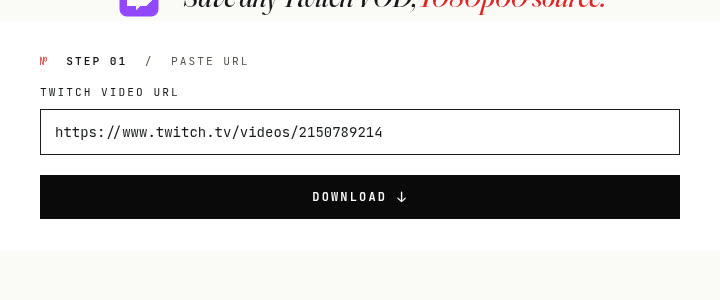
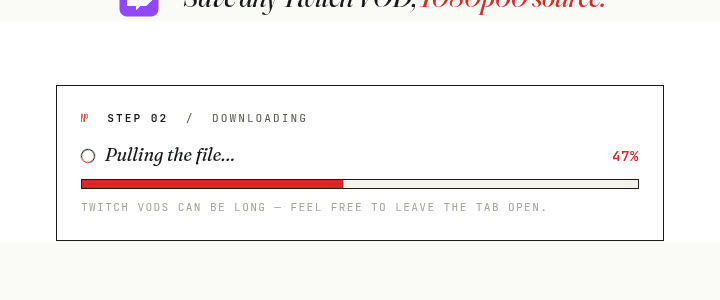
Stream-fetch server-side.
Our system fetches the video directly from Twitch and writes to MP4 as it streams — no browser memory limits.
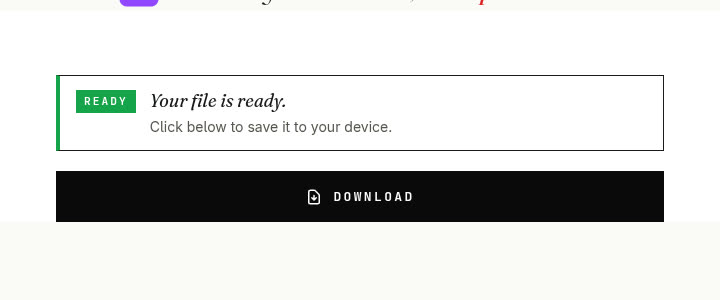
Download MP4.
Save the Twitch video or clip directly to your device — source-quality MP4, never re-encoded.
№ 04 / Features
TW Golem features.
VOD + clip
VOD & Clip downloads
Download full Twitch VODs (Past Broadcasts), popular Clips, and streamer Highlights.
Paste
Simple link import
Just paste the Twitch video or clip link to start — VOD, Clip, and Highlight URLs all auto-detected.
Speed
Fast processing
Quickly fetches and prepares Twitch videos for download — network-bound, not buffer-bound.
Quality
1080p60 source
Save videos in the best available quality — source 1080p60 when broadcast at that level. No re-encoding.
Devices
Works on any device
Use our online Twitch downloader on PC, Mac, iPhone, Android — all server-side, no browser storage limits.
№ 05 / Use cases
Why download Twitch videos?
Saving Twitch content lets you watch offline, preserve moments, create new content, and more.
№ 01
Watch streams offline
Download long VODs to watch later without buffering or needing an internet connection, perfect for travel.
№ 02
Highlight reels
Save the best clips or segments from VODs to easily edit together for YouTube, TikTok, or other platforms.
№ 03
Archive broadcasts
Permanently save your own past streams or memorable moments from others before Twitch potentially deletes VODs.
№ 04
Review gameplay
Download VODs for detailed analysis of gameplay, strategies, or specific moments without relying on Twitch playback.
№ 05
Share moments
Download a specific clip or timestamped VOD segment to easily share with friends or communities.
№ 06
Educational
Save tutorials, workshops, or informative streams hosted on Twitch for offline learning and reference.
№ 06 / Glossary
Understanding Twitch video types.
VOD
Video on Demand
Full recordings of past live streams. VODs can be very long — sometimes 10+ hours for marathon streams. They are automatically saved by Twitch but may expire after 14-60 days depending on the streamer's subscription tier. Download them before they disappear.
Clip
Clips
Short segments (5-60 seconds) created by viewers to capture memorable moments. Clips are publicly accessible and don't expire. They are perfect for sharing the best moments of a stream on social media.
Highlight
Highlights
Curated segments selected by the streamer from their VODs. Unlike regular VODs, highlights are permanent and don't expire. Streamers use highlights to showcase their best content.
№ 07 / Quality & issues
Quality and common issues.
Quality
Available quality options
TW Golem downloads Twitch videos in the best available quality, typically up to 1080p60 (Full HD at 60 frames per second) — the same source quality that was broadcast live. The actual quality depends on the streamer's broadcast settings. Most popular streamers broadcast at 1080p60 or 900p60.
Issues
Troubleshooting tips
- →VOD not found: The VOD may have expired or been deleted by the streamer. Twitch VODs have a limited retention period.
- →Subscriber-only content: Some VODs are restricted to subscribers. TW Golem can only download publicly accessible content.
- →Slow download: Very long VODs (10+ hours) take more time to process. The download happens server-side, so you can close the tab and come back.
- →Format issues: All downloads are saved as MP4, which is compatible with every device and video player.
№ 08 / Reviews
Trusted by streamers & viewers.
"Downloading my VODs to edit for YouTube used to be a pain. TW Golem makes it incredibly simple and fast. Essential tool for me now!"
"I missed a stream but wanted to watch it offline on my commute. This downloader worked perfectly for the VOD. Saved me from buffering!"
№ 09 / Pricing
Three plans, no usage caps.
Every plan unlocks all four AppsGolem tools — Twitch plus the YouTube cutter, TikTok downloader, and most-replayed extractor.
Monthly
Try without commitment. No auto-renewal.
- ✓Unlimited Twitch downloads
- ✓All four tools unlocked
- ✓1080p60 source, no watermark
Yearly
Less than €2 / month. Best value for active users.
- ✓Save 83% vs monthly
- ✓Unlimited Twitch downloads
- ✓All four AppsGolem tools
- ✓1080p60 source, no watermark
Lifetime
Pay once. Use forever. No renewals.
- ✓Pay once, never again
- ✓All future tools included
Secure payment via Stripe. No auto-renewal on any plan.
№ 10 / Ready
Save any Twitch VOD
No installs. 1080p60 source MP4. €18/year unlocks unlimited across every tool.
№ 11 / Questions
Twitch downloader —
your questions answered.
What is TW Golem?
TW Golem is an online tool that allows you to download Twitch videos, specifically VODs (Past Broadcasts) and Clips, directly to your device.
How does the Twitch Video Downloader work?
Provide the URL (link) of the Twitch VOD or Clip. Our system will process the link and provide you with downloadable MP4 file(s) in available qualities.
Do I need to install any software?
No installation needed. TW Golem is a web-based Twitch downloader accessible from any modern browser on any device.
Can I download VODs and Clips?
Yes, our tool supports downloading both full Twitch VODs (Past Broadcasts) and shorter Twitch Clips.
What quality can I download videos in?
You can typically download videos in the qualities available on Twitch, such as 1080p, 720p, or 'Source' quality when available.
Can I download subscriber-only VODs?
Generally, you can only download VODs that are publicly accessible. Downloading subscriber-only content is typically not possible due to Twitch's restrictions, unless you are logged into Twitch with appropriate permissions (this tool may not support authenticated downloads).
Is it legal to download Twitch videos?
Downloading Twitch content is primarily intended for personal offline viewing or archiving your own streams. Respect Twitch's Terms of Service and copyright law. Re-uploading or distributing content without permission from the streamer may infringe copyright.
Are my downloads tracked?
We prioritize user privacy. We do not track or log the specific Twitch videos you download. Refer to our Privacy Policy for details.
What should I do if I encounter issues?
If you have trouble downloading a Twitch VOD/Clip or have questions, please contact our support team using theSupport Form. We'll do our best to help.
№ 12 / Also part of AppsGolem


